
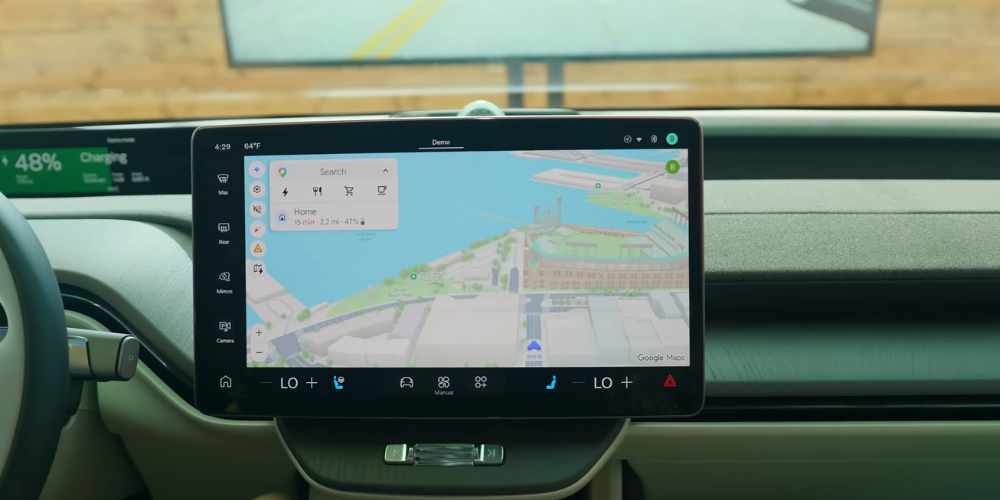
Android Auto’s Next Update Signals a Major Shift in In-Car Experience
Driving interfaces are starting to feel less like basic infotainment systems and more like connected smart devices. Google’s latest Android Auto showcase at Google I/O revealed a major shift in how drivers and passengers may interact with cars later this year.
The update introduces a redesigned interface, AI-powered Gemini tools, immersive navigation, customizable widgets, and deeper vehicle controls through Android Automotive.
The upcoming changes focus less on flashy additions and more on improving daily driving tasks. From clearer navigation guidance to smarter dashboard layouts, the update aims to reduce distractions while making in-car technology feel more natural.
A Cleaner and Smarter Dashboard
The refreshed Android Auto design follows Google’s Material 3 Expressive style language. While the visual update may sound minor on paper, the difference becomes noticeable once displayed on a vehicle dashboard.
The interface now features rounded elements, smoother transitions, and color themes that blend more naturally across apps. Instead of looking like separate windows running side by side, the dashboard feels more unified, similar to using an Android tablet.
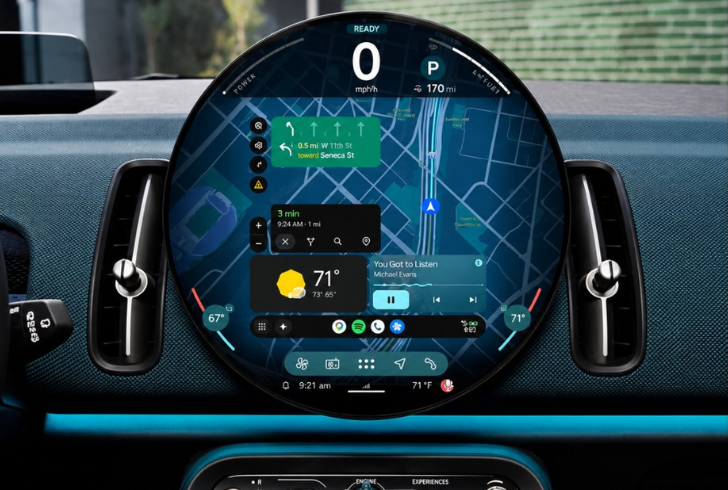
Instagram | hassanadx | The new Material 3 design completely transforms the Android Auto dashboard experience.
One of the biggest additions is the new three-panel layout. Drivers can simultaneously view Google Maps, smart home controls, and media playback without clutter taking over the screen. During Google’s demo inside the Volvo EX60, a YouTube video player automatically switched to audio-only mode once driving resumed. That small adjustment keeps entertainment accessible without interfering with road safety.
Custom-generated widgets also add more flexibility to the dashboard experience. These widgets can be created using prompts, allowing drivers to personalize information based on daily needs.
Google demonstrated a weather widget that analyzed conditions for activities like running and biking. Other practical uses may include traffic summaries, commute updates, nearby food recommendations, or reminders linked to regular routes.
Google Maps Gets More Realistic
Google Maps is receiving one of the most noticeable improvements in the update. The new immersive navigation system displays buildings, stadiums, hills, tunnels, and overpasses with far more detail than before.
That added context may help drivers better understand upcoming roads and lane positioning, especially in dense cities where multiple levels of traffic can quickly become confusing. Areas filled with elevated roads, tunnels, and sharp lane changes often create navigation mistakes because standard map views lack depth and spatial awareness.
The upgraded visuals are designed to make routes easier to interpret at a glance. Instead of relying only on flat map guidance, drivers can now recognize landmarks and terrain in a more realistic format.
Gemini Expands Beyond Voice Commands
Google’s Gemini integration appears to be the centerpiece of Android Auto’s next phase. The AI assistant is being built to handle tasks in a more conversational and practical way, particularly during situations where drivers cannot safely interact with screens.
Vehicles using Android Automotive, Google’s built-in operating system, will gain access to deeper controls. During demonstrations inside the Volvo EX60, Gemini adjusted vehicle settings such as ambient lighting and sunroof opacity through voice commands alone.
The level of functionality will depend heavily on how each automaker supports Android Automotive features. Some manufacturers may allow extensive vehicle controls, while others could offer more limited integrations.
Gemini is also moving toward multimodal assistance. The AI can access vehicle cameras to identify surrounding landmarks and buildings. During one demonstration, Gemini recognized the Transamerica Pyramid and responded with additional details about the structure.
This approach shifts the assistant from simple command processing into something closer to a real-time driving companion.
More Natural Navigation Prompts
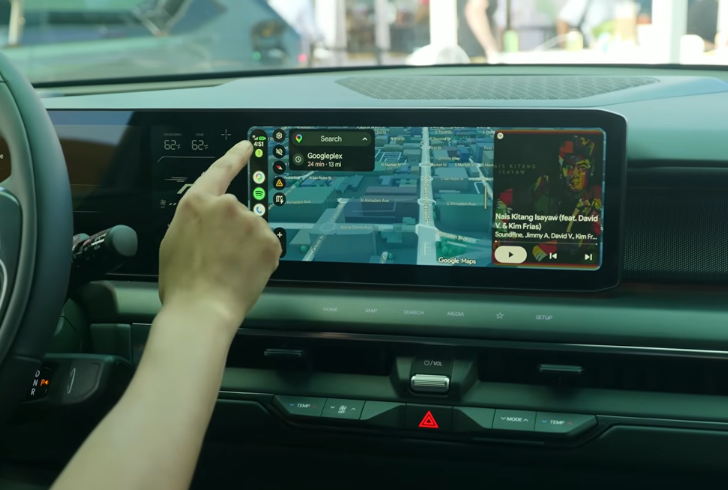
YouTube | CNET | A new Android Auto rolls out this year, featuring Gemini AI, customizable widgets, and immersive Google Maps.
A smaller update may end up having one of the biggest real-world benefits. Gemini’s navigation instructions now sound more human and easier to process while driving.
Instead of saying phrases like “turn left after 0.2 miles,” the assistant can deliver instructions such as “turn left at the intersection.” That adjustment removes unnecessary mental calculations and makes directions easier to follow during busy traffic conditions.
Simple language matters when drivers are focused on the road, changing lanes, or dealing with unfamiliar streets. Clear prompts reduce hesitation and improve reaction time, especially in crowded urban environments.
Android Auto’s Next Step
Google confirmed that the updated Android Auto experience will roll out gradually later this year. The release includes redesigned visuals, immersive Google Maps features, Gemini integration, customizable widgets, and expanded Android Automotive support.
The transition may still vary depending on vehicle compatibility and manufacturer support. Some cars will likely receive features faster than others, while certain Gemini capabilities could remain exclusive to Android Automotive systems.
Even so, the latest showcase signals a noticeable change in how in-car software is evolving. Android Auto is no longer focused only on mirroring smartphone apps. The platform is moving toward a smarter, more context-aware driving experience that blends navigation, communication, entertainment, and vehicle controls into a single connected system.
More inAuto News
-
`
 Why Advanced Headlights Used Worldwide Are Still Restricted in America
Night driving was once associated with quieter roads and a calmer driving experience. Today, many motorists face a different reality. Intense...
June 28, 2026 -
`
 How 2026 Graduates Can Establish a Solid Financial Ground for Future Decades
Graduation marks the beginning of a new financial chapter filled with opportunities, responsibilities, and choices that can shape the future. The...
June 26, 2026 -
`
 Is Running Your AC All Day Saving Money or Raising Energy Bill?
As temperatures climb, air conditioners become one of the hardest-working appliances in many homes. A common belief is that keeping an...
June 21, 2026 -
`
 Everything You Ought to Know About Car Insurance in Texas
Texas drivers cover millions of miles every day. They go through packed highways in Houston, long stretches of interstate roads in...
June 18, 2026 -
`
 Why Liability Auto Insurance Is Required but Full Coverage Isn’t
Car insurance rules often feel uneven. One part is enforced by law, while another is left to personal choice or financial...
June 14, 2026 -
`
 Mitsubishi Ends its U.S. Pickup Hiatus With Nissan-sourced Truck Aimed at Toyota Tacoma & Chevy Colorado
Mitsubishi is getting ready for a major comeback in the United States. After years of sitting on the sidelines in key...
June 12, 2026 -
AISD-77 fallback smoke aisd-77-smoke-72138678
Verifying the WordPress publisher’s auth-fallback cascade. This draft post can be deleted.
June 10, 2026 -
AISD-77 fallback smoke aisd-77-smoke-7c83fc49
Verifying the WordPress publisher’s auth-fallback cascade. This draft post can be deleted.
June 10, 2026 -
`
 Tesla Officially Launches Its Full Self-Driving (FSD) Package in China
Tesla has finally crossed a major hurdle in China. After years of regulatory roadblocks, speculation, and industry chatter, the company has...
June 6, 2026
More From CashRoadster
-
 State Farm Is Sending Out $5 Billion in Dividends. Here’s Who Qualifies
After several years of rising auto insurance costs, some State Farm customers are now getting money back. State Farm has started...
Car InsuranceSeptember 6, 2026 -
 Nissan’s Big Bet on Aggressive Discounts Is Fueling Sales As Competitors Pull Back
Nissan is spending more money to get buyers into its cars, and the strategy is producing results. While several major rivals...
Auto NewsSeptember 3, 2026 -
 Hyundai Gives Its Wild Baja Santa Fe Render the Green Light
The Hyundai Santa Fe is designed as a practical family SUV, but a new digital rendering gives it a very different...
Auto NewsAugust 30, 2026 -
 Andy Green and JCB Set New Hydrogen Speed Record of 406 MPH
Hydrogen power just had a very fast day in Utah. British land speed legend Andy Green drove the JCB Hydromax to...
DrivingAugust 27, 2026 -
 Ford Reveals “Fathom,” Its New Electric Truck With a $29,945 Price Tag
Ford is preparing a new electric pickup called the “Fathom,” with a planned starting price of $29,945 after destination. The truck...
DrivingAugust 22, 2026
You must be logged in to post a comment Login